Yazılar

Nothing Phone 1 Receives Android 15 Update Featuring AI-Driven Smart Drawer and Enhanced Customization

The Nothing Phone 1 has started receiving the latest stable update to Nothing OS 3.0, based on Android 15, in a phased rollout. This update introduces a range of new features and visual enhancements designed to improve user experience. The update retains the brand’s signature dot-matrix typeface but expands the customization options available to users. Among the notable additions are new home and lock screen customizations, an upgraded pop-up view, and the introduction of an AI-powered smart app categorization feature. This makes the Phone 1 the latest device in the Nothing lineup to receive the Android 15 update, following the rollout for the Phone 2a Plus, Phone 2a, and Phone 2 in December.

One of the standout features of the Nothing OS 3.0 update is the AI-powered smart drawer. This new feature automatically organizes apps into folders based on usage patterns, providing a more intuitive and streamlined app experience. Users can also pin their most frequently used apps to the top of the app drawer for quicker access, improving overall convenience. The smart drawer is just one of many enhancements designed to make navigating the device more efficient and user-friendly.

In addition to the app drawer improvements, the update introduces a new lock screen customization page. Accessible through long-pressing the lock screen or via the customization window, this feature offers new clock face styles and expanded widget space, allowing users to add more widgets to the lock screen for greater personalization. These changes provide a more dynamic and customizable experience, allowing users to make the device truly their own.

Other visual upgrades in the Nothing OS 3.0 update include redesigned quick settings, a revamped widget library, and enhanced settings for a more cohesive user interface. The update also brings a new dot animation for actions like unlocking the device and charging, adding a playful and visually pleasing touch to system interactions. With these improvements, the Nothing Phone 1 becomes even more refined, offering users a fresh and intuitive experience powered by the latest Android 15 features.
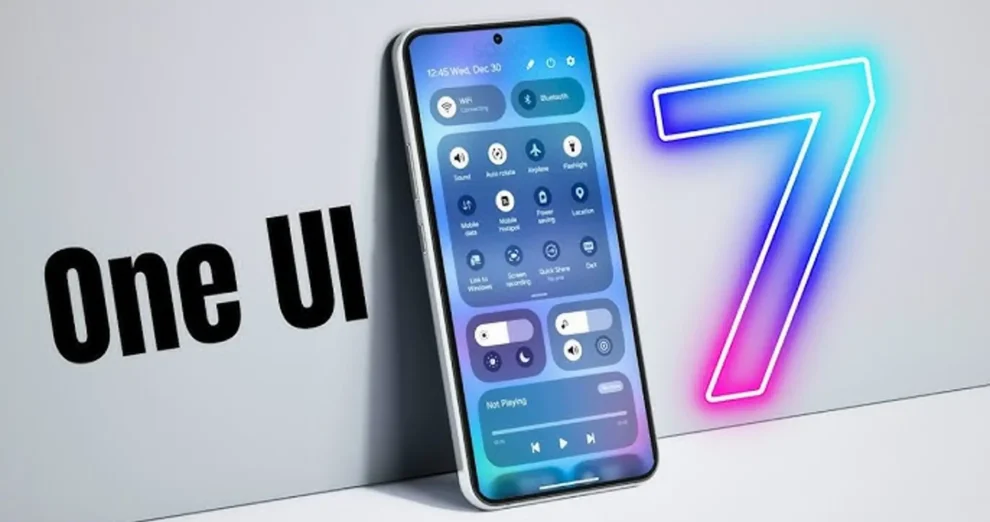
Samsung’s One UI 7 Update Schedule Leaked for Galaxy S24 and Earlier Models

Samsung’s upcoming One UI 7, which will be based on Android 15, is set to make its debut on eligible smartphones, but the company is expected to roll out the update later than some of its competitors. While brands like OnePlus and Oppo have already begun deploying their Android 15 updates for flagship devices, Samsung has not yet officially confirmed when it will begin the One UI 7 beta testing phase. However, a recent leak has revealed potential timelines for when Samsung Galaxy S-series devices will receive both the beta and stable versions of One UI 7.

According to a tipster on X (formerly Twitter), the One UI 7 beta program could kick off as early as next month. The leak, attributed to Samsung insiders, suggests that Samsung will initiate the beta phase for the Galaxy S24 series, which includes the Galaxy S24, S24+, and S24 Ultra, during the first week of December. This timeline means that users of Samsung’s latest flagship series could be among the first to experience the new features and improvements of Android 15 under the One UI 7 skin.

The leak also hints at the possibility of a wider rollout for older Galaxy S-series devices after the S24 series gets its beta update. Samsung typically offers a gradual rollout of its major updates, starting with its newest devices and then expanding to earlier models. The stable release of One UI 7 is expected to follow the beta testing phase, which may take several weeks or months depending on the feedback and testing results.

While the official confirmation from Samsung is still pending, these leaked details provide some insight into the company’s update strategy for its Galaxy S series. One UI 7 is expected to bring several enhancements, including UI tweaks, performance improvements, and deeper integration with Android 15’s new features. Samsung users are eager to see how these changes will improve their device experience, particularly given the delays compared to other manufacturers.

Android 15 Introduces True Adaptive Refresh Rate Support for Smartphones and More Devices

Android 15, which was globally released in August, has brought several notable improvements to the Android ecosystem. Since its launch, smartphone manufacturers such as OnePlus, Oppo, and Realme have begun rolling out their own custom versions of the update for their devices. One of the standout features in Android 15 is the introduction of true adaptive refresh rate (ARR) support. This new functionality allows devices to adjust the refresh rate of their displays based on the content being shown, offering a smoother and more efficient user experience.

While support for adaptive refresh rates has been available since Android 11, Android 15 takes the concept a step further with a more refined method. Previously, adaptive refresh rate (ARR) was implemented through refresh rate switching, where the device would switch between predefined display modes—such as 60Hz, 90Hz, 120Hz, or 144Hz—depending on the content being displayed. However, Android 15 introduces true ARR, which enables the system to adjust the refresh rate within a single mode, making the experience far more fluid and seamless.

This update allows displays with ARR support to decouple the VSync (vertical synchronization) rate from the refresh rate, meaning the system can sync the frame rate with the content’s cadence more precisely. By dynamically adjusting the refresh rate based on the specific content being viewed, the device can offer smoother visuals without sacrificing performance or battery life. This is a significant leap forward compared to older methods of refresh rate switching that often involved larger jumps between fixed modes.

The introduction of true ARR in Android 15 offers two key benefits for users: improved battery efficiency and reduced stuttering, or “jank,” during transitions. With ARR, the device can lower its refresh rate during less demanding tasks, like reading static text or browsing, thereby conserving power. Simultaneously, when viewing fast-moving content, such as videos or games, the refresh rate can ramp up for a smoother experience. This results in a more responsive and energy-efficient display that adapts intelligently to the user’s activity.